
Project management software that keeps work, time and money on track
Plan projects into milestones and tasks, see who is doing what on boards and timelines, log time against every task and bill from the hours. Budgets and profitability update as work happens.
- Tasks tracked in WhatsApp groups and Excel
- Hours worked but never billed
- Budget overruns found at the end
Updated just now
| Project | Client | Progress | Status |
|---|---|---|---|
| Website Redesign | Acme Studio | 72% | In progress |
| Mobile App v2 | Northline | 45% | At risk |
| ERP Rollout | Vista Foods | 100% | Completed |
| Brand Campaign | Om Hardware | 30% | In progress |
Projects that run late, over budget and partly unbilled
When tasks live in chats, time in spreadsheets and budgets in someone's head, problems show up only at the end.
average budget overrun on large IT projects, which also deliver 56% less value than planned
Source: McKinsey & University of Oxfordless value than predicted is what large IT projects deliver on average
Source: McKinsey & University of OxfordA 20-person services team billing ₹1,500 an hour
Assumptions
- 2 extra billable hours per person a week captured by timesheets on tasks
- Hours that were previously forgotten or logged too late to bill
Deliver on time and know which projects make money
What teams get from one project system.
Everyone knows what's next and when it's due.
Timesheets linked to tasks and billing.
Budget versus actual as work happens.
At-risk projects flagged before they slip.
Shared progress and approvals.
Works with CRM Software and ERP Software.
See Project Management before you talk to anyone
Click through the main modules. Then book a live demo and we will show them working on your own process.
Updated just now
| Project | Client | Progress | Status |
|---|---|---|---|
| Website Redesign | Acme Studio | 72% | In progress |
| Mobile App v2 | Northline | 45% | At risk |
| ERP Rollout | Vista Foods | 100% | Completed |
| Brand Campaign | Om Hardware | 30% | In progress |
Updated just now
| Task | Assignee | Due | Status |
|---|---|---|---|
| Payment screen | Imran | Today | In progress |
| Push notifications | Neha | Fri | To do |
| Login bug | Vikram | Today | In review |
| App store assets | Asha | Mon | Done |
Updated just now
| Milestone | Start | End | Status |
|---|---|---|---|
| Requirements | 1 Oct | 8 Oct | Done |
| Configuration | 9 Oct | 28 Oct | Done |
| Data migration | 29 Oct | 10 Nov | In progress |
| User training | 11 Nov | 18 Nov | Planned |
Updated just now
| Person | Project | Hours | Status |
|---|---|---|---|
| Imran Shaikh | Mobile App v2 | 42 | Approved |
| Neha Rao | Website Redesign | 38 | Approved |
| Vikram Singh | Mobile App v2 | 44 | Pending |
| Asha Kulkarni | Brand Campaign | 30 | Approved |
Updated just now
| Cost head | Budget | Actual | Status |
|---|---|---|---|
| Design hours | ₹3.0 L | ₹2.8 L | On budget |
| Development hours | ₹6.5 L | ₹3.9 L | On budget |
| Stock images | ₹0.4 L | ₹0.5 L | Over |
| Hosting | ₹0.6 L | ₹0.2 L | On budget |
Updated just now
| Bug | Priority | Assignee | Status |
|---|---|---|---|
| Crash on checkout | Critical | Vikram | Open |
| Wrong currency symbol | Medium | Imran | In progress |
| Slow image load | Low | Neha | Open |
| Login timeout | High | Vikram | Fixed |
Plan the work and see its health at a glance.
- Templates for repeat projects
- Milestones and deliverables
- Project health and status
Everyone knows what to do next.
- Kanban, list and calendar views
- Sub-tasks, checklists and priorities
- Assignees and due-date alerts
Dependencies and deadlines on one chart.
- Gantt with dependencies
- Critical path and slippage
- Resource load view
Every hour logged against a task.
- Timer and manual entry
- Approval by managers
- Billable and non-billable time
Profit per project, not guesswork.
- Budget vs actual by cost head
- Invoices from approved hours
- Expenses and purchases
Defects and client requests in one queue.
- Priority and severity
- Linked to tasks and releases
- Client-raised requests
Keep clients informed without extra calls.
- Share project progress
- Files and discussions
- Approvals on deliverables
Utilisation, delivery and profitability.
- Utilisation by person
- On-time delivery rate
- Profit by project and client
How work moves through Project Management
One flow from the first step to the last, with nothing retyped.
Turn a won deal into a project plan
Start from a template, set milestones, budget and team, and share the plan with the client.
- Project templates
- Milestones, budget and team
- Client-visible plan
Updated just now
| Project | Client | Progress | Status |
|---|---|---|---|
| Website Redesign | Acme Studio | 72% | In progress |
| Mobile App v2 | Northline | 45% | At risk |
| ERP Rollout | Vista Foods | 100% | Completed |
Run the work on boards and timelines
Tasks move across the board, dependencies show on the Gantt and blockers surface early.
- Kanban and Gantt views
- Due-date and blocker alerts
- Files and discussions on tasks
Updated just now
| Task | Assignee | Due | Status |
|---|---|---|---|
| Payment screen | Imran | Today | In progress |
| Push notifications | Neha | Fri | To do |
| Login bug | Vikram | Today | In review |
Log time and watch the budget
Hours are logged against tasks and approved, and the budget updates as work happens.
- Timesheets with approval
- Budget vs actual
- Utilisation by person
Updated just now
| Milestone | Start | End | Status |
|---|---|---|---|
| Requirements | 1 Oct | 8 Oct | Done |
| Configuration | 9 Oct | 28 Oct | Done |
| Data migration | 29 Oct | 10 Nov | In progress |
Invoice from approved hours
Approved billable hours and expenses become invoices, so nothing worked is left unbilled.
- Invoices from timesheets
- Milestone billing
- Profit by project
Updated just now
| Person | Project | Hours | Status |
|---|---|---|---|
| Imran Shaikh | Mobile App v2 | 42 | Approved |
| Neha Rao | Website Redesign | 38 | Approved |
| Vikram Singh | Mobile App v2 | 44 | Pending |
Connect Project Management to the rest of your business
SaaS tools, high-end licensed suites, or Project Management?
Most businesses we meet have tried one of the first two. Here is how they compare.
A separate subscription for CRM, accounts, HR, inventory and support.
- Per-user fees for every tool, rising every year
- Data split across apps that don't talk to each other
- Workarounds in Excel to join it all up
- Nobody owns the whole picture
Large ERP suites from global vendors, set up by big implementation partners.
- High licence and implementation cost before go-live
- Projects that run for many months
- Every change needs a consultant
- Features you pay for and never use
Ready software from Involve, set up around your process and run by our team.
- One system for the whole business
- One price for the whole business, unlimited users
- Live in weeks with a phased rollout
- Changes and support from the team that built it
| Many SaaS tools | High-end licensed suites | Project Management | |
|---|---|---|---|
| Cost model | Per user, per app, per month | Licences, implementation and yearly maintenance | One price for the business, unlimited users |
| Cost as you grow | Rises with every new user and app | Rises with users, modules and partner days | Stays predictable |
| Fit to your process | You adapt to each tool | Fits after costly customisation | Configured for your process |
| Time to go live | Fast per tool, slow to join up | Often many months | Weeks, phase by phase |
| Data in one place | No, split across tools | Yes | Yes |
| Changes and support | Vendor tickets for each app | Partner consultants, billed by the day | Our in-house team, in your time zone |
| Your branding | No | Limited | Yes |
| Demo before buying | Trials per tool, on your own | Usually a standard sales demo | Guided demo set up around your process |
General comparison of typical approaches, not of a specific vendor.
Project Management vs popular tools
How we compare with the usual options.
| Project Management (Involve) | Asana | Monday.com | Jira | |
|---|---|---|---|---|
| Pricing model | One price, unlimited users | Per user per month (paid tiers) | Per seat per month | Per user per month (paid tiers) |
| Timesheets and billing in the same system | Via integrations | Add-ons | Marketplace apps | |
| Budgets and profit per project | Limited | Limited | ||
| Set up for your process by our team | Partners | Partners | Partners | |
| Your branding |
Based on publicly available information as of November 2026.
Live on Project Management in four simple steps
- 1Book a live demo
30–45 minutes on your process, not a generic tour.
Day 1 - 2We map and configure
Modules, roles, approvals and reports set up for you.
Week 1–2 - 3Migrate and train
Your data moved and checked; every team trained.
Week 2–4 - 4Go live with support
Hypercare after launch, then monthly support.
Week 4+
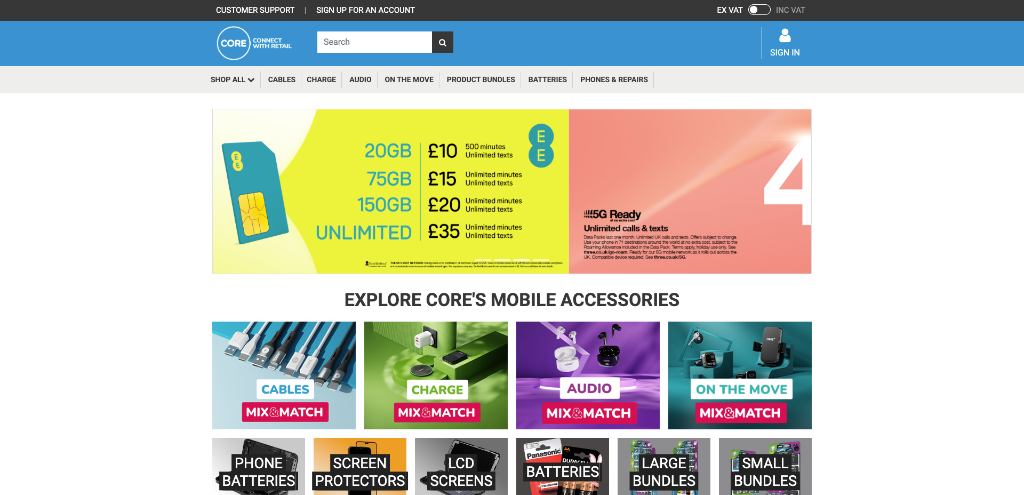
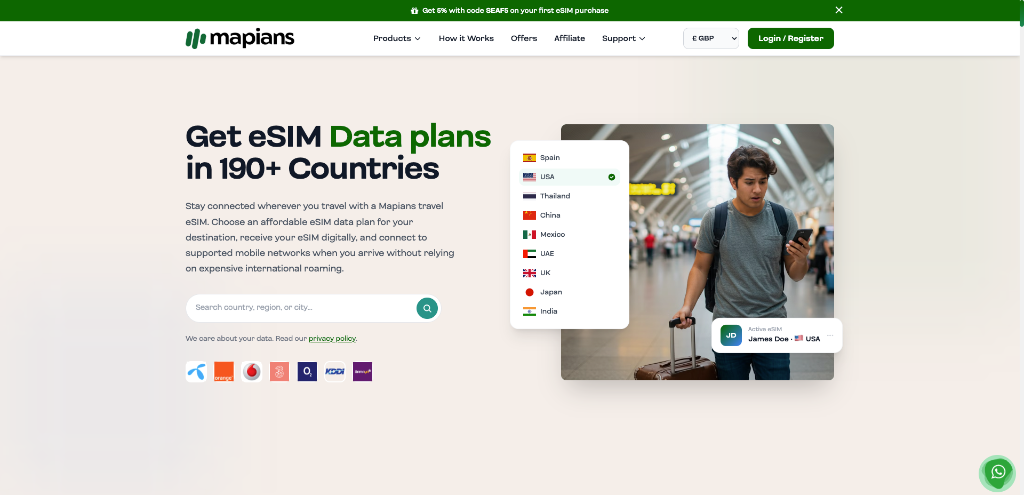
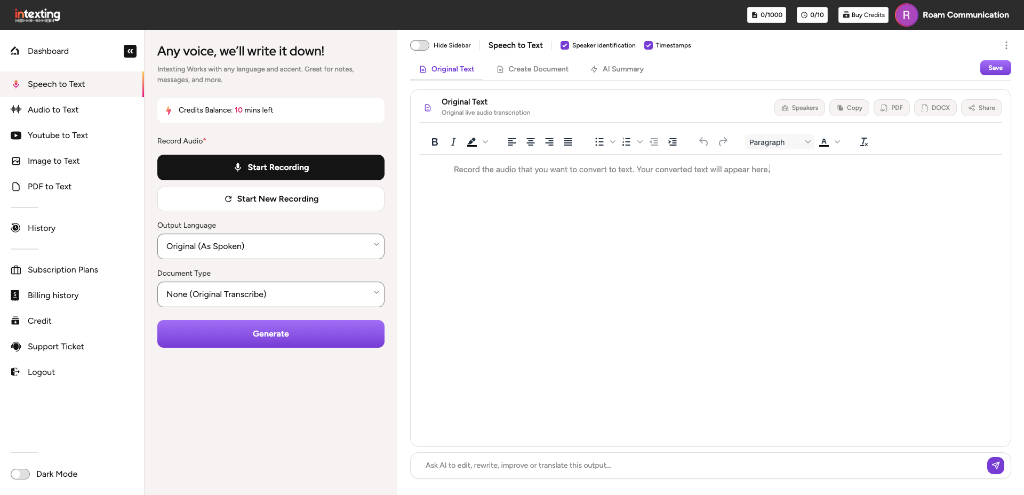
Screens from projects we built and run
Taken from live client systems. Client data is masked. Open any project to see the problem, what we built and the result.
Work we have delivered
Real projects from our clients and products, with the problem, what we built and the outcome.
 Core Communications
 Limited
Telecom, UK
Custom Laravel topup management portal with AWS infrastructure, n8n workflow automation, telecom carrier API integrations, automated MIS, and dedicated AWS engineering pods.
 Mapians
.com
Travel eSIM brand
eSIM management portal featuring telecom carrier integration and automated QR code delivery upon purchase.
 Intexting
.com
Involve-built product
AI speech, audio, video, and image-to-PDF tool purpose-built for government employees and legal practitioners.
A registered, certified company behind every product
Involve Digital Technologies Private Limited builds, hosts and supports these products from Nashik, with teams for the UK and the UAE.
The team you will actually work with
No hand-offs to freelancers. The people below lead the audit, the build and the support, from our Nashik office.
Meet the full team NK
 SK
 UW
 MR
 NC
Six commitments, in writing, before you sign
They are part of every proposal for Project Management. After go-live you also get 30 days of free hypercare: anything we built that does not work as agreed is fixed at no cost.
The price in your signed scope is what you pay. Any change needs your written approval first.
The written audit summary is yours to use with any vendor, with no obligation to hire us.
Weekly demos and a written update, so you always know what is done and what is next.
Full source and data export at any time. No lock-in, no hostage hosting.
Every message answered within one business day, with faster response times on Manage plans.
We sign your NDA, or ours, before we see your systems or data.
See Project Management working on your process
A 30–45 minute live demo with our product consultant. We start with your needs, show the screens that matter to you and explain how we would customise Project Management for your business.
- Tell us about your businessYour team, your process and what isn't working today.
- We tailor the demoWe set up the modules and examples that match your work.
- See it live and get a planA walk-through, your questions answered, and a written plan with a fixed quote.
Project Management FAQs
Can we bill clients from timesheets?
Yes. Approved billable hours and expenses become invoices, and the project's profit updates automatically.
Does it have a Gantt chart?
Yes. Milestones and tasks with dependencies show on a Gantt timeline, alongside Kanban and list views.
Can clients see progress?
Yes. You can share project progress, files and approvals with clients without giving them access to internal data.
Can we move from Asana, Trello or Excel?
Yes. We import projects, tasks and history and check them with you before go-live.
Is there a limit on users or projects?
No. Add your whole team and all your projects.
Does it work with our CRM and accounts?
Yes. Won deals in CRM Software can create projects, and billing flows into ERP Software or your accounting system.
Why businesses choose Involve Technologies
Software, AI and platforms are only half of it. The other half is the team that sets them up for your business and keeps them running.
We audit, build, migrate, train and support. You deal with one team from first call to monthly support.
Our own developers customise and extend what we deliver, so changes do not wait on an outside vendor.
Scope, timeline and monthly plan are written down before work starts.
Hands-on training for admins and staff in English, Hindi and Marathi.
Dedicated environments, backups and full data export whenever you need it.
A monthly Manage plan with a named team that knows your setup.
Let's talk about Project Management Software
Tell us what you need in four quick steps. You get a reply from a consultant, not an auto-responder.
- Free 45-minute discovery call
- Indicative quote on the call
- Mutual NDA on request